
How to Register MPTAAS Profile ID (Hitgrahi Panjiyan) & Apply PMS Scholarship 2025-26
Last Updated: [January 26, 2026] | Portal Status: 🟢 Active for 2025-26 Applications
The Madhya Pradesh Tribal Affairs Automation System (MPTAAS) profile registration is the first mandatory requirement for students to access state-funded scholarship schemes. The process of creating a new beneficiary profile on the MPTAAS portal 2.0 has been updated. This new process integrates your Samagra ID and Aadhaar e-KYC to create a unique Beneficiary Profile ID.
Students belonging to the SC, ST, and OBC categories must verify Samagra e-KYC (requirement) before proceeding to the registration form. To receive a state-funded post-matric scholarship (PMS) from the Tribal Welfare Department of Madhya Pradesh, a valid MPTAAS profile ID is required to access educational benefits for the academic year 2025–26.
This guide explains the step-by-step process to make an MPTAAS profile ID on the official portal, tribal.mp.gov.in, and outlines the documents required during registration. After successfully creating a profile, students can use their MPTAAS login credentials to apply for the PMS through the portal.
Table of Contents
Essential Documents Required for Registration on the Portal
Make sure you have these three documents before proceeding to fill out a registration form on the official portal.
- Samagra ID
- Caste Certificate (SC, ST, OBC)
- Income Certificate (Updated)
What is MPTAAS Profile ID (Hitgrahi Profile Panjiyan Kya Hota Hai)
MPTAAS Profile ID is a permanent, unique identification number assigned to a student by the Tribal Welfare Department of Madhya Pradesh during the online registration process. This single ID is valid for your entire educational career (from Class 11 to Ph.D.). The SC, ST, and OBC students can apply for (PMS), manage profile corrections, and track scholarship status from the initial approval stage to the final DBT payment disbursement.
New Student Registration: (MPTAAS Profile Kaise Banaye Hitgrahi panjiyan)
If you are a first-year student for the 2025-26 session, follow this verified step-by-step guide to create your MPTAAS Profile ID (Hitgrahi Profile Panjiyan) on the official website.
Step 1: Access the Official MPTAAS Portal
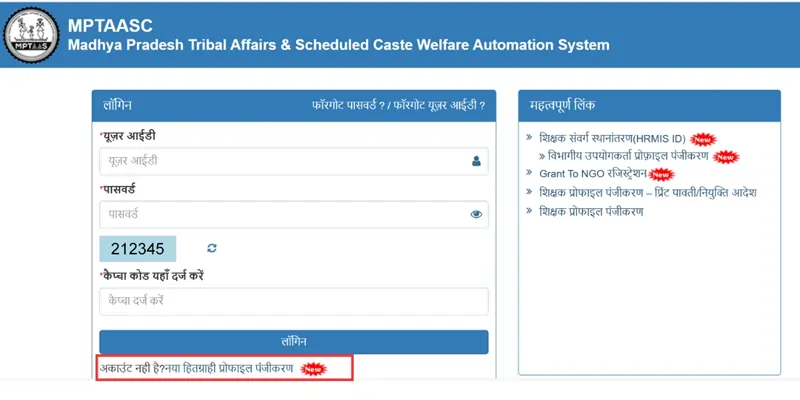
Open web browser and visit the Official MPTAAS scholarship Portal at https://tribal.mp.gov.in. On the homepage, look for the “New Beneficiary Profile Registration” (नया हितग्राhi प्रोफाइल पंजीकरण) link under the login section.
Step 2: Samagra ID Verification & Data Fetching:
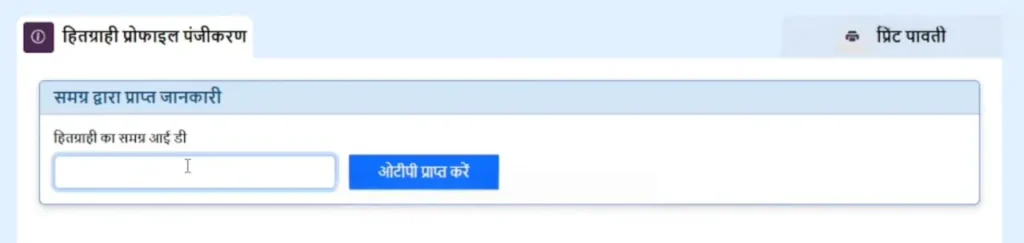
Enter your 09-digit Samagra Member ID and click “Fetch Details.” Samagra auto-fills your personal and family information, Father Name, Name, & address from the Samagra database.
Pro Tip: If your fetched Samagra data is incorrect, you must update it on the Samagra portal first, as MPTAAS does not allow manual name corrections or any other changes.
Step 3: Complete Aadhaar e-KYC (OTP Method)
Enter your 12-digit Aadhaar number. You will receive an OTP on your Aadhaar-linked mobile number. Enter the OTP to verify your identity. This step is crucial for activating your Aadhaar Seeding status for future payments.
As of July 2025, the National Scholarship Portal (NSP) One-Time Registration (OTR) is mandatory for both new and existing students. Without Aadhaar e-KYC, your scholarship amount will not be disbursed into your bank account.
Pro Tip for 2025: Before you begin to fill out your MPTAAS scholarship application form, ensure you have generated your NSP OTR ID. This ID is now being linked with state portals like MPTAAS to prevent duplicate applications. You can generate this via the NSP OTR mobile App from the Google Play Store using Face-Authentication.
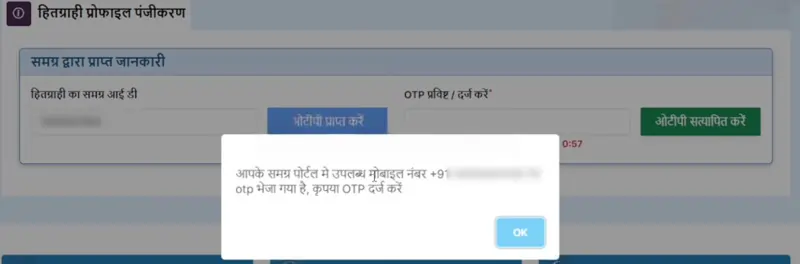
Note: Whatever data is in your Aadhaar will also appear in your Samagra profile because MPTAAS fetches data from the Samagra citizens’ database.
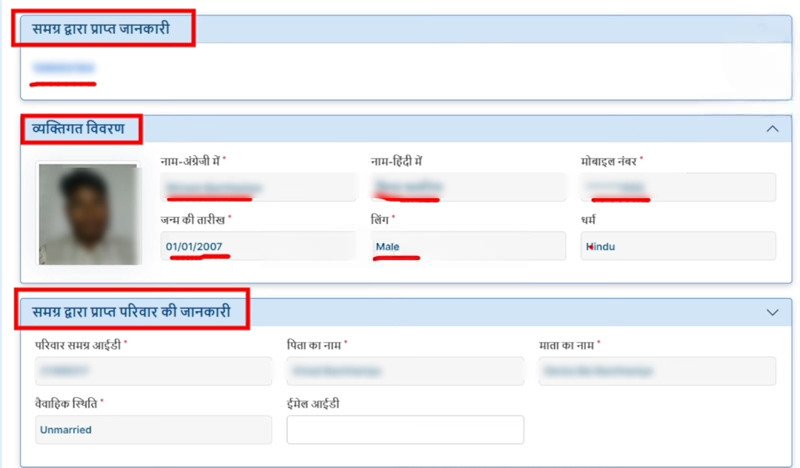
Verify Fetched Details from Samagra (Name, Mobile, Date of Birth, Gender, Religion, Mother/Father Name). If you need a correction, fix it on Samagra first.

Step 4: Enter Digital Caste & Income Details & Disability Certificate
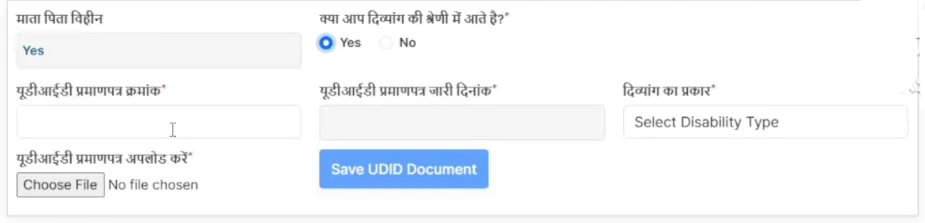
Input your Digital Caste Certificate number, your family’s Income Certificate details, and Disability Certificate (if any), and other details. The system will verify these against the e-District database. Ensure your income certificate is updated for the financial year 2025-26. It will also show the Direct Bank Account (DBT) status. If DBT is not active, you must activate it.
Important Note: According to the latest MPTAAS portal updates, scholarship applicants must ensure their bank accounts are Aadhaar-seeded (NPCI Mapped) to receive payments. The Tribal Affairs Department verifies your National Payments Corporation of India (NPCI) mapping status before approving any disbursement. If your bank account is not ‘Aadhaar Seeded,’ your Direct Benefit Transfer (DBT) payment will fail, even if your application is sanctioned.”
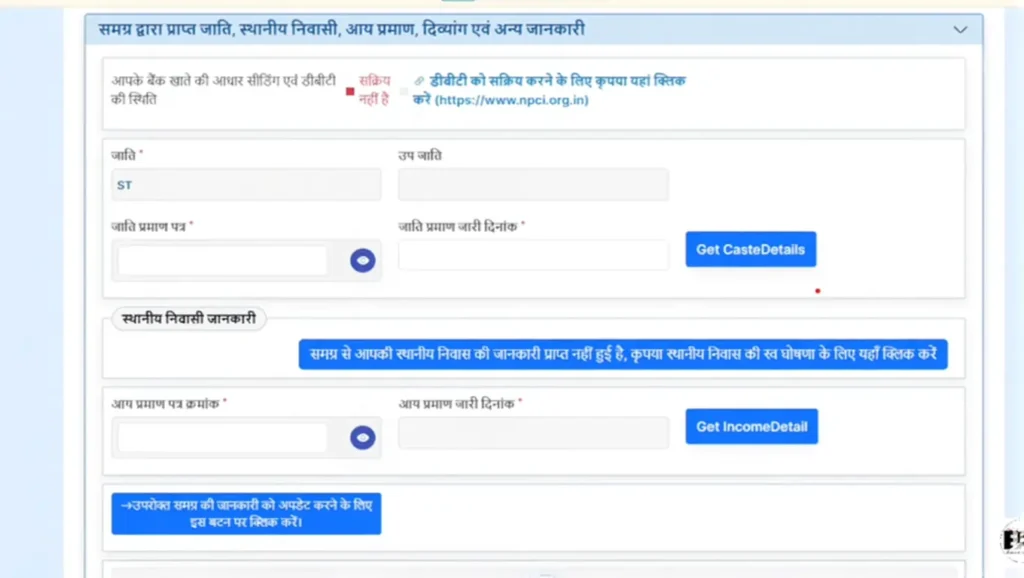
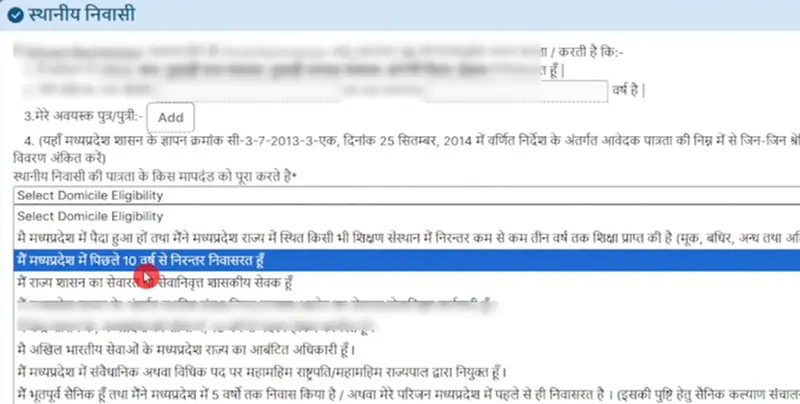
Update your domicile information. Click the option that you have been living in the state of Madhya Pradesh continuously for the past 10 years.
Enter your income certificate number and its issue date. Click “Get Income Detail” to fetch the income information.

Select “No”. If you are not disabled.
Your district, area (rural/urban), local body (Nagar Nigam, Nagar Palika, Janpad Panchayat, etc.), ward/village, and full address will appear automatically.
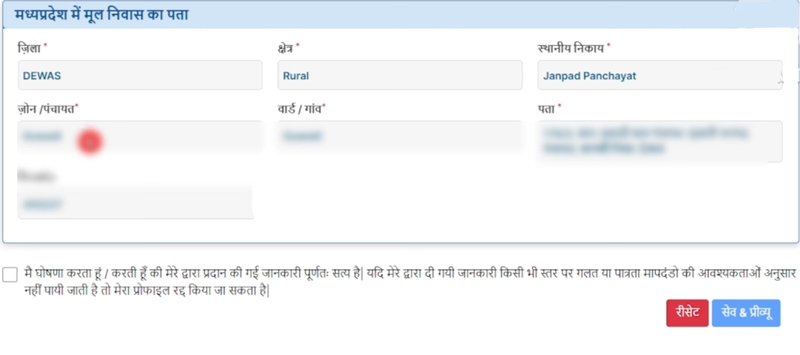
Step 5: Review Profile & Set Password
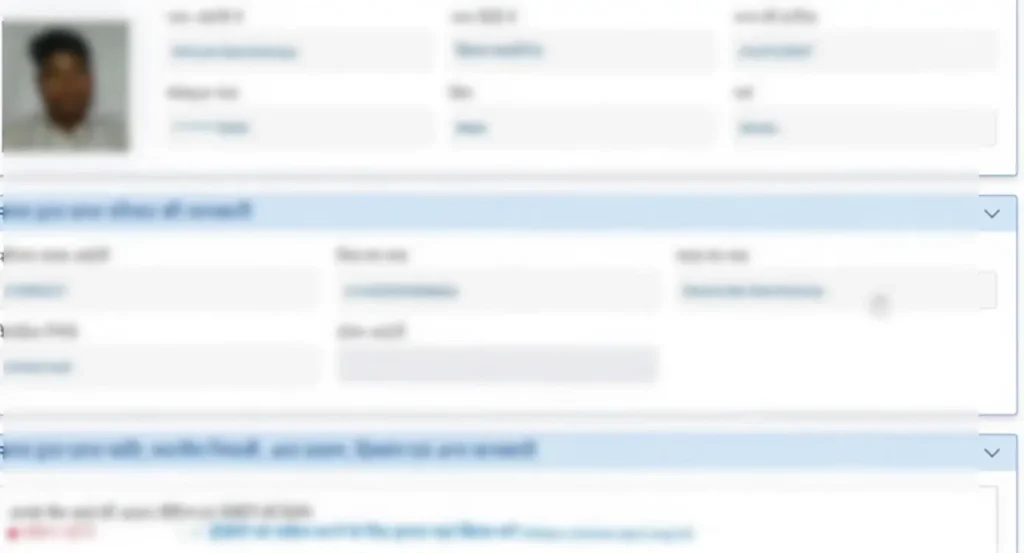
A preview of your “Hitgrahi Profile” will appear. Check all details carefully. If correct, click on “Submit.”
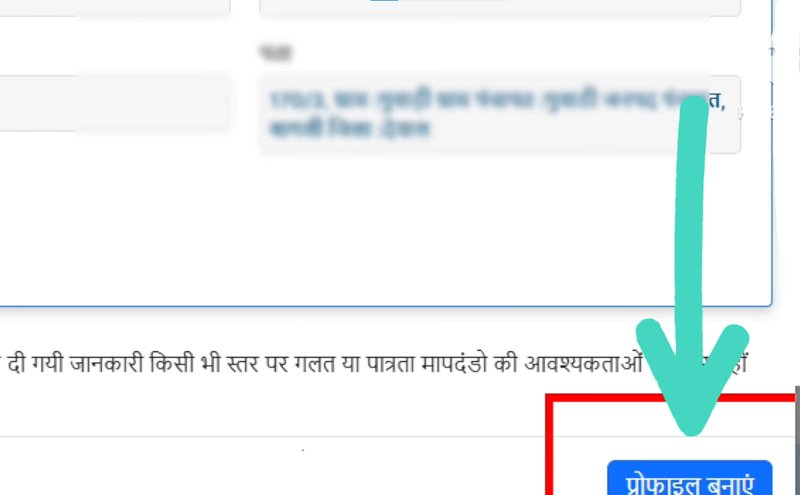
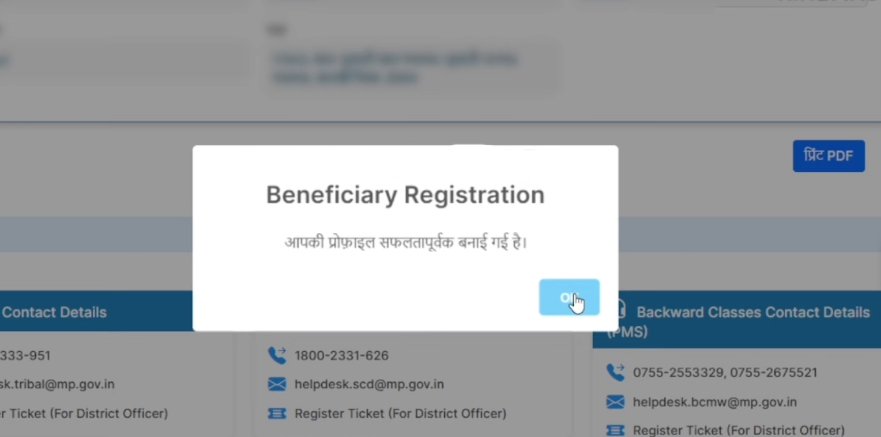
Your profile will be successfully created. Copy your User ID. The password will be sent through SMS. If you don’t receive the password, use the “Forgot Password” option, enter your profile number, verify via OTP, and create a new password.
Step 6: Link NSP OTR (Mandatory for 2026)
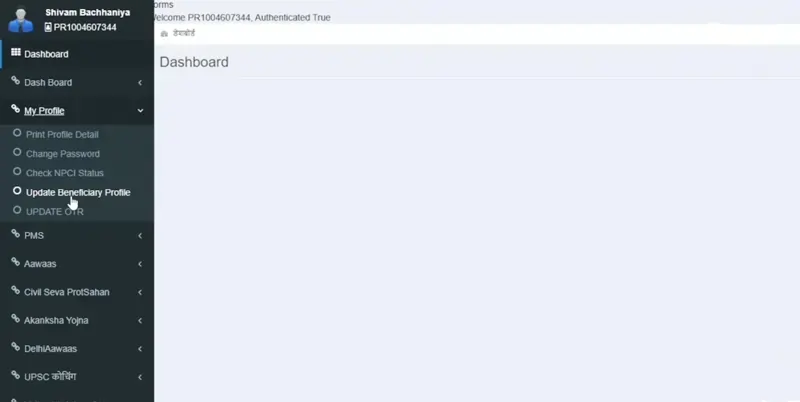
After creating the profile, log in to your dashboard and navigate to the “Update NSP OTR” section. Enter your 14-digit National Scholarship Portal OTR ID to synchronize your state and central records.
MPTAAS Login 2026: How to access the MPTAAS portal as an existing user
With your MPTAAS profile 2026 successfully registered, you can access the MPTAAS login page to manage your account. The MPTAAS dashboard provides comprehensive access to apply for the current year scholarship, renew existing scholarships, update personal information, and check your MPTAAS scholarship status in real-time.
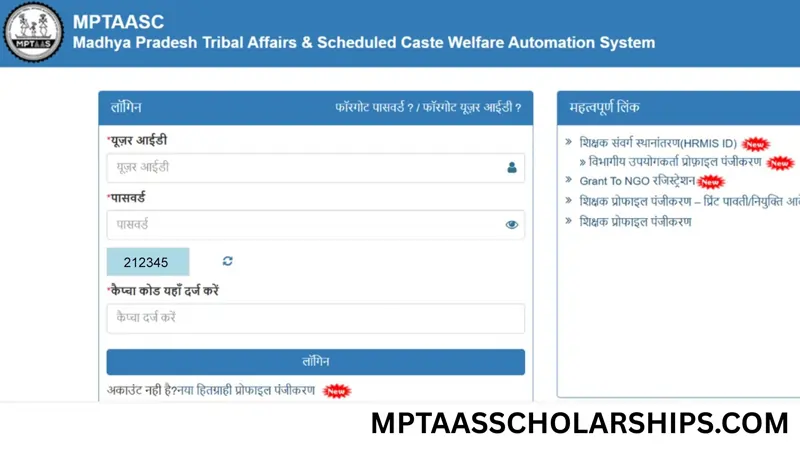
Troubleshooting login issues (Forgot Profile ID or Password)
Pro Tip: In-case you forgot your password or User ID? on the login page. Use the ‘Forgot Password’ link and reset it using your registered mobile number, Email or Samagra ID. Use your own phone or PC to get an OTP and reset your details.
How to apply for PMS Scholarship 2025-26 on MPTAAS Portal
- Visit https://tribal.mp.gov.in, enter User ID & Password & fill the Captcha to log in to the dashboard.
- On the left-hand side of the dashboard, click on the option “PMS” and click on “Application Apply”. (The academic session 2025-26 has officially started.
- Enter Admission Year (2025-26), Application Type (Fresh) & Course Year (First Year), and click on Go to apply.
- Enter College and Admission Details: Select State: Madhya Pradesh, Choose District and College Name correctly, Enter Admission Date, Enter Admission ID/Application Number, click on “Get Admission Details”. If you see an error related to admission data not uploaded, contact your college to get your data updated by the nodal officer.
- Upload scanned copies of the required documents prescribed (Size & Format)
- Aadhaar Card
- Samagra ID
- Caste Certificate
- Income Certificate
- Domicile Certificate
- Marksheet
- Admission Slip/Fee Receipt
- Bank Passbook
- Photograph
- Verify Details and Submit Application: Review all entered information carefully, and details match Aadhaar and Samagra records. Apply for final verification.
- Track Scholarship Status: After submission, regularly check your MPTAAS scholarship status from the dashboard for verification, approval, and payment updates.
Frequently Asked Questions
What are the common mistakes to avoid during profile registration?
The most common mistakes during profile registration include:
Submitting Aadhaar details without updated biometric verification or a linked mobile number.
Entering incorrect personal or academic details without verifying them before submission.
Uploading required documents in an unsupported format or incorrect file size instead of the accepted PDF, PNG, or JPG format.
How do I print my MPTAAS profile or export it as a PDF?
To print your profile, go to the “My Profile” option on the left-hand side and click on “Print Profile Details.” Your profile will open, and you can either print it or export it as a PDF and save it for future use.
Add Image
MPTAAS Profile Registration Kaise Kare & Why is my ID failing?
To complete your MPTAAS Profile Registration (Hitgrahi Panjiyan), you must use your correct 9-digit Samagra Member ID. Mismatched IDs are the leading cause of registration failures on the portal. Before you begin the MPTAAS Scholarship Online Form, ensure your Aadhaar is linked to your mobile number for mandatory e-KYC OTP verification.
How to fix MPTAAS Login OTP Problem or Verification Errors?
If you are facing an MPTAAS Login OTP problem, try refreshing the portal or clearing your browser cache. For a secure and successful login, always use your personal mobile phone to receive the OTP and ensure you have a stable internet connection. Avoid using public or shared devices to protect your sensitive scholarship data.
What is the last date to apply on the MPTAAS portal for the scholarship 2025
The last date to apply on the MP TAAS portal for fresh and renewal scholarship applications is expected to fall in January 2026. If you have questions, call the official helpline number.
How to complete the MPTAAS Profile Correction for Name or Date of Birth?
You cannot edit sensitive details like your Name, Date of Birth, Gender, or Caste directly on the MPTAAS portal. To fix these errors, you must first update your information on the Samagra Portal. Once your Samagra e-KYC is updated, log back into your MPTAAS dashboard; the system will automatically fetch the corrected data from the Samagra database.
How to Download or Print MPTAAS Profile ID Receipt?
To get your MPTAAS Profile ID print, log in to the portal using your User ID and Password. On your dashboard, click on “Print Profile” or “View Profile Details.” You can save the document as a PDF or print it directly. This receipt is often required by colleges during the document verification process for Post-Matric Scholarships.
Why is my MPTAAS Profile not updating after Samagra e-KYC?
If your corrected details are not reflecting, it is usually because the portal hasn’t refreshed the data. Log out and clear your browser cache, then log in again. Go to the profile section and click on the “Refresh” or “Re-fetch” button to sync the latest information from the Samagra Portal to your MPTAAS profile.
MPTAAS Profile Edit Kaise Kare (How to update Mobile and Bank details)?
For basic updates such as your mobile number, address, or bank account, log in to the official portal at tribal.mp.gov.in. Navigate to your student dashboard and select the “Profile Update” option. Ensure your bank account is Aadhaar Seeded (NPCI Mapped) during this update to ensure your DBT scholarship payment is not blocked.