
Samagra Portal MP: e-KYC, NPCI Status, Print/Download Guide
Last Updated: [January 29 2026] | Portal Status: 🟢 Active for 2025-26 Applications
The Samagra Social Security Mission (SSSM) portal is a unified database of all citizens launched in 2010 by the Government of Madhya Pradesh. Its core purpose is to ensure government benefits reach only eligible families, facilitates cross department data validation, and promote transparency across the state. The MPTAAS portal uses the Samagra ID as a primary key to automatically fetch and verify student details like name, category, and family income from the SSSM database, ensuring a seamless and error-free registration process.
The portal maintains a centralized database and assigns a unique identification number issued at both the family and individual levels. By shifting from “Individual-based” schemes to “Family-based” tracking, the portal ensures that vulnerable families can access multiple government benefits through a single, transparent digital window.
In this comprehensive guide, you will learn how to navigate to the Samagra portal—from primary objectives and eKYC requirements to the secure OTP-based login and ID download procedures.
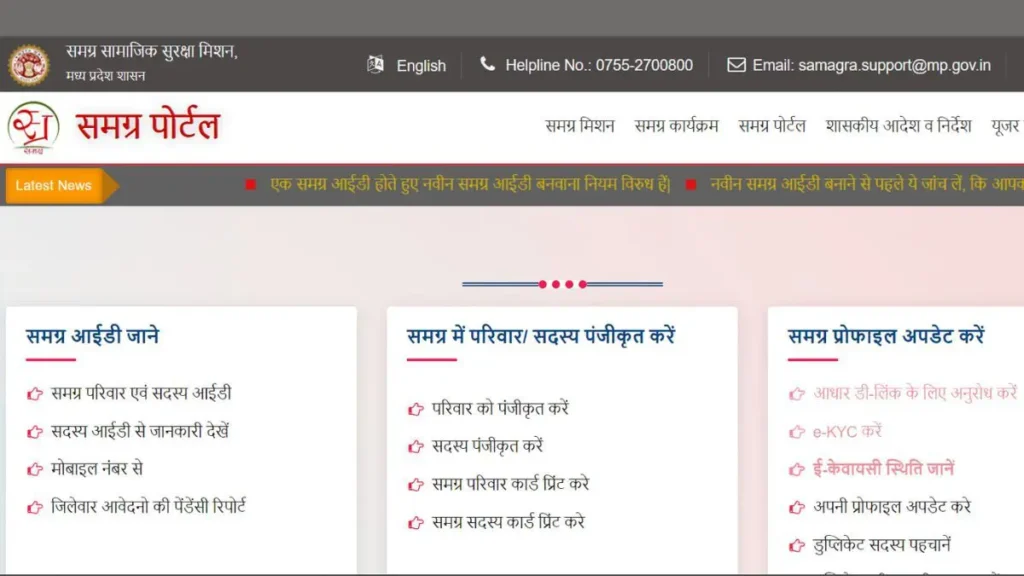
What is Samagra ID
A Samagra ID is a unique identification number categorized into two types:
- Family Samagra ID (8 Digits): Assigned to the entire household.
- Member Samagra ID (9 Digits): Assigned to each individual family member.
Today, this 9-digit Individual Member ID is referred to as the SSRNID (Samagra Samajik Suraksha Registration Number) issued by the Samagra Portal. It is the “Master Key” for all major state schemes, including state-level scholarships like MPTAAS, social security pensions, Ration Cards (PDS), old-age disability support, and public healthcare services.
This is the unique code that the MPTAAS portal uses to automatically fetch your verified data (Caste, Income, and Name) from the state’s central server. Since its integration with Aadhar in 2014, to prevent duplicate beneficiaries.
What is Samagra Portal
The Samagra Portal is the official government platform that has simplified the process of managing citizen data and applying for government financial aid. The portal allows citizens of MP to generate their IDs, update personal information, view existing family details, track application status, remove family members, and complete e-KYC verification. This portal centralizes all essential services in one place.
Portal Details
| Features | Details |
| Portal Name | Samagra Portal |
| Launched By | Government of Madhya Pradesh |
| Official Website | website |
| Objective | To provide a unique ID and ensure transparent distribution of schemes. |
| Types of Samagra ID | Family ID (8 Digits), Member ID (9 Digits) |
| Beneficiaries | Permanent residents of Madhya Pradesh |
| Services Available | ID Generation, Scholarship Application, Pension, Data Correction, Ration Card Linking |
| Process | Online via Portal or Offline via CSC/Panchayat Centers |
What are the Uses of Samagra ID
| Service | Required ID | Primary Use Case |
| Education Schemes | Member ID | School Enrolment & State Scholarships |
| Health Schemes | Member ID + Aadhaar | Essential for Ayushman Card generation |
| MPTAAS Scholarship | SSSRNID | Mandatory for SC/ST/OBC student profiles |
| Ration Card | Family ID | Adding members to the PDS system |
Quick Registration Process for Samagra Portal MP
- Visit the Official Website.
- Select Service: On the homepage, under “Citizen Services,” choose “Register Family” or “Register Member” based on your needs.
- Mobile Verification: Enter the mobile number of the Family Head (must be linked to Aadhaar) and verify via OTP sent to your mobile number.
- Fill the Form: Enter details such as Head of Family name, Date of Birth, gender, and address (Village/Town, Ward, District).
- Upload Documents: Upload required files like Aadhaar, Residence Certificate, and Fresh Photographs.
- Submit: Once submitted, your Family ID will be generated after verification.
Step-by-Step: New Family Registration on MP Samagra Portal
Step 1: Click on the “Register Family” option on the homepage.
Step 2: Enter the mobile number linked to the Family Head’s Aadhaar card.
Step 3: Enter the OTP received on your mobile and verify.
Step 4: The registration form will open. Fill in the Head of Family’s details and address accurately.
Step 5: Click “Request OTP for Verification” and enter the new OTP.
Step 6: You can now add individual family members by clicking the “Register Member” option.
Step 7: Complete the Captcha and click Submit.
Step 8: After successful verification, you can download or print the registration form.
How to Register a New Member in Samagra ID
How to Download or Print Samagra Card
Required Documents
How to complete Samagra e-KYC (Aadhaar Linking)
Troubleshooting: Common Rejection Reasons
If your application for a new ID or e-KYC was rejected, it is likely due to one of these three reasons:
- Document Blur: The uploaded photograph or Aadhaar scan was not legible.
- Name Mismatch: The name in the Samagra application does not match the Aadhaar record exactly (even a missing middle name can cause a rejection).
- Address Conflicts: Providing an address outside of Madhya Pradesh for a permanent residency benefit.
The Link Between Samagra and MPTAAS Scholarship Application
For SC/ST students, the Samagra ID and SSSRNID act as the foundation for the MPTAAS scholarship application 2025- 26. While the Samagra portal verifies your social and family status, the MPTAAS portal handles the actual scholarship status and funds disbursement. You cannot complete your MPTASS profile on the scholarship portal without a verified Samagra e-KYC.
New Requirement: Mandatory MPTAAS OTR & ABC ID
In addition to the Samagra ID, the current academic session has introduced two new mandatory identifiers that every student must link to their MPTAAS profile:
NSP OTR ID (One-Time Registration): This is a 14-digit unique ID from the National Scholarship Portal. It is now used to track individual beneficiaries across different scholarship schemes to prevent duplication. You can generate this via the NSP MPTAAS OTR App using face authentication.
ABC ID (Academic Bank of Credits): A 12-digit digital locker for your academic credits and marks. It is mandatory for all students in higher education. You must create this through Digi Locker and link it to your MPTAAS profile.
What is Ayushman Card: Benefits and Download Guide
Under the Ayushman Bharat Yojana, eligible families receive free medical treatment up to ₹5 Lakh annually. This scheme is valid in all government and empanelled private hospitals. Your name must be linked to your Samagra ID to appear on the eligibility list.
Hit grahi ID ke liye abhidan