
MPTAAS Status Check Online: Track Your MPTAAS Scholarship Status 2026
Last Updated: [February 10, 2026] | Portal Status: 🟢 Active for 2025-26 Applications
In this guide, we will explain how students can check the Mahya Pradesh Tribal Affairs Automation System (MPTAAS)scholarship status (New/Renewal) online for 2025. We’ll also break down the meaning of each MPTAAS status check message from Applied, Pending Verification, Verified, and Approved. Furthermore, we will demystify the MPTAAS payment status cycle (N/A, Sanctioned, Pending for Payment, and Paid) so you know exactly when your funds will be disbursed and credited in your bank account.
We provide accurate, verified information about MPTAAS scholarship status directly from the official Department of Tribal Affairs, Madhya Pradesh, to resolve your common problems, ensure your data’s security, and your peace of mind. For complete Samagra ID details, you can also check our dedicated guide.
Table of Contents
How to check your MPTAAS scholarship status: A Step-by-Step Guide
Follow simple steps to keep track of your MPTAAS scholarship application status online. You need a stable internet connection and login credentials ready, which you made at the time of registration.
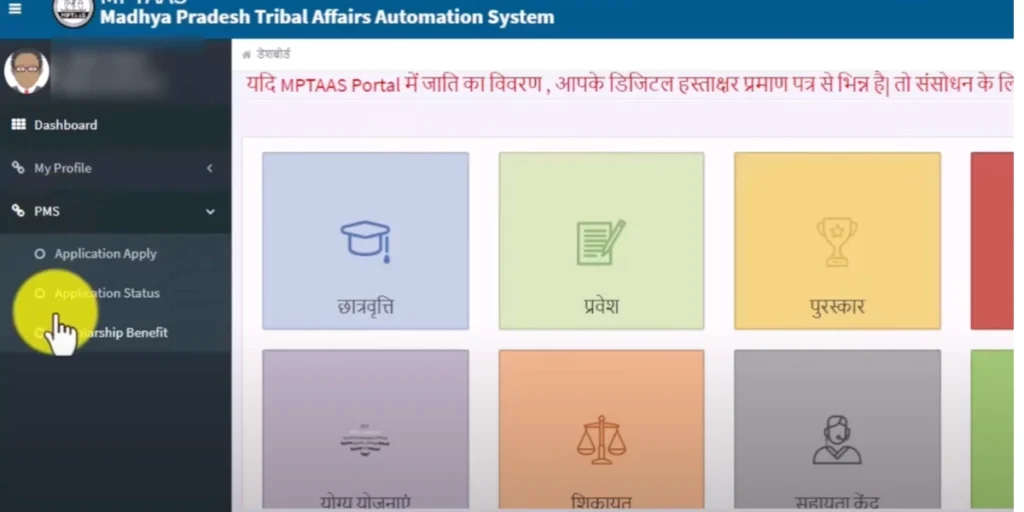
- Go to the official MPTAAS portal: www tribal mp gov in.
- On the homepage, locate and click on the “Scholarship” or “Student Login” section to proceed.
- From Student login page add your;
- User ID / Application ID: Your unique registration ID.
- Password: The password you created during registration. In-case you forgot you can recover it.
- Security Captcha: Enter the code shown in the image.
- Now in your student dashboard click on the “Track Application Status” option on the homepage.
- Click Submit Click on it to view the current status of your MPTAAS 2024-25 application.
- In the Application Status tab, it shows “pending for verification“.
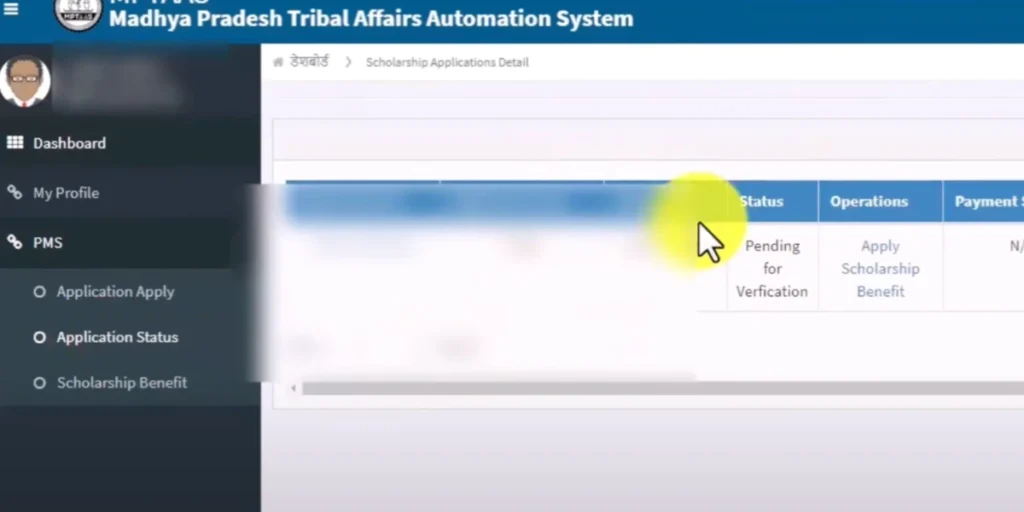
Note :-) The MPTAAS scholarship status check feature allows students to stay updated and make sure their application is processed without a delay. The following information helps you to identify your current application and status in the portal’s dashboard.
How to know your MPTAAS Application Status?
After submitting your Post Matric Scholarship (PMS) form on the MPTAAS portal as a Fresh student or for Renewal (2nd/3rd year). The MPTAAS system initiates a multi-stage verification process. You can track this journey under the “Application Status” tab. Here, understanding the status message is the most critical part.
- Applied: As soon as you submit your application form (Fresh or Renewal) the status shows “Applied”.
- Pending for Verification: Your application is under verification at the Institute or District Level. Within 8 to 10 days of submission, your form will be forwarded to the department for cross-departmental data validation of your uploaded documents (Income, Caste, Domicile, etc.) for accuracy.
- Verified: Once the document checking process is complete and no discrepancies are found, your status changes to “Verified.”
- Approved: The final stage of the application process, where your profile is cleared for fund allocation. You can see a message as “MPTAAS scholarship status approved”. Your application has been verified and sanctioned for direct bank transfer.
- Rejected: Your application has been reviewed and not found eligible for the scholarship. You may consider alternative funding options or reapply in the next cycle if eligible.
- On Hold: Your application is temporarily on hold due to incomplete information, discrepancies, or pending verification. Address any outstanding requirements to proceed.
- Disbursed: Your scholarship funds have been released to your bank account or other designated mode of payment.
- Cancelled: Your scholarship has been cancelled due to non-compliance with program guidelines, ineligibility, or other reasons.
Understanding MPTAAS payment status: From sanction to disbursement
Once your application status moves to “Approved,” the official workflow for fund release begins. It is important to note that without the “Approved” status, your payment section will remain blank or stuck.
Here is the step-by-step breakdown of the MPTAAS Payment cycle:
| Status Message | Meaning & Current Stage | Action Required |
| NA (Not Available) | Successful stage; wait for the fund release. | No action; wait for 7-10 days. |
| Pending for Sanction | Final audit stage. System is checking your NPCI mapping. | Ensure Aadhaar is linked to your bank. |
| Sanctioned | Budget is officially allocated to your Profile ID | Depends on the Govt. fund availability. |
| Pending for Payment | Depends on the Govt fund availability. | The file is in the queue for the Ministry of Finance to release the budget. |
| Paid | Funds successfully transferred via PFMS/DBT | Check your Bank Passbook manually. |
Important Note: If your status is “Paid” but money is not in your account, visit your bank to ensure your DBT/NPCI status is active. Sometimes SMS alerts are not sent even after a successful credit.
Why was my MPTAAS scholarship sanctioned but not received?
If your MP Scholarship 2.0 scholarship is sanctioned but not credited, first verify the scholarship status and check your bank passbook, as SMS alerts may not be delivered. If the status is not sanctioned, the application may be pending with the college or nodal officer; if sanctioned, the delay usually occurs at the collectorate payment transfer stage, not due to budget shortage.
In such cases, contact the official MPTAAS helpline with sanction details or visit the collectorate office for resolution.
Crucial insights on MPTAAS instalments
The MPTAAS system typically follows a 60:40 disbursement ratio (Central Share vs. State Share). You might notice two separate entries in your payment processed status:
Expert Tip: If your status check is stuck at “Pending for Sanction” for too long, visit your bank and ensure your Aadhaar Mapping (MPTAAS NPCI Status) is active. Without an active MPTAAS NPCI link, the system cannot trigger the “Paid” status even if the budget is available.
How to activate/update MPTAAS NPCI Status
The MPTASS scholarship amount provided by the government is transferred directly to your Aadhaar-linked bank account. However, linking through the National Payments Corporation of India (NPCI) is mandatory. So, let us understand the complete process of linking NPCI on the MPTAAS portal.
Now, you will see the NPCI status updated. Congratulations! Your NPCI link status has been successfully updated.
MPTAAS Scholarship Renewal Status
After submitting the scholarship renewal form, you can monitor your application renewal status from your dashboard. Here we break down all status messages so that you can understand the scholarship renewal phase.
MPTAAS Scholarship Amount Details (2025-26)
The financial assistance provided under the MPTAAS scholarship varies based on your course and whether you are a hosteller or a day scholar. Below is a reference table for MPTAAS Scholarship amount based on course category, hosteller Amount, day scholar & other benefits (paid monthly for 10 months).
| Course Category | Hosteller Amount (₹) | Day Scholar Amount (₹) | Other Benefits |
| Class 11th & 12th | ₹230 – ₹380 | ₹380 – ₹1,200 | Tuition & exam fee reimbursement |
| Undergraduate (B.A., B.Sc., B.Com) | ₹300 – ₹570 | ₹570 – ₹1,200 | Maintenance allowance + fees |
| Postgraduate (Nursing, LLB, Pharmacy) | ₹550 – ₹1,200 | ₹1,200 – ₹2,300 | Covers higher tuition and hostel costs |
| Professional Courses (Engg, Medical, PhD.) | ₹1,000 – ₹1,500 | ₹2,000 – ₹2,500 | Full/partial fee reimbursement |
MPTAAS Scholarship Eligibility Criteria – Quick Summary
Read the complete MPTAAS Scholarship eligibility criteria, including detailed income rules, category-wise conditions, common rejection reasons, and the complete list of documents required for a successful application.
Frequently Asked Questions
My MPTAAS Awas Sahayata (Grahawas) second instalment status is stuck at ‘Verified’ but not showing “Approved”?
You should wait some time to get it approved by the department.
My status is currently ‘Sanctioned.’ How long does it take to move to ‘Pending for Payment’ and finally receive the funds?
It takes up to 1 month to reflect the fellowship payment in your bank account.
The payment status shows ‘N/A’ and the NPCI section is blank with no amount displayed. Is there a problem with my application?
A blank NPCI status indicates an inactive bank DBT link, requiring immediate NPCI mapping at your bank branch. After successful account linking and portal synchronization, the system automatically updates your payment status and scholarship amount.
Why my payment disbursed but not received in my bank account?
You need to match your bank account number and IFSC code on the MPTAAS portal. Ensure a valid & operational bank account that allows DBT Payments. Now wait for a week after the Disbursed status appears on your portal’s dashboard. Contact your bank with the UTR (Unique Transaction Reference) number from the portal for payment tracking.
What to do when my application is rejected?
Log in to your student dashboard portal and find the specific reason for rejection. Gather the correct, attested documents. Check the official notifications or contact your academic institute to see if there is an appeal or grievance redressal process for the current academic year.
My MPTAAS application was rejected.
Your application was rejected for the reasons specified on the portal (e.g., invalid document, income certificate issue, bank details mismatch). Note this reason carefully for future corrections or appeals. You can also contact the MPTAAS helpline: 1800-2333-951 or visit your institute’s scholarship cell for help.
Ambuj kushwaha
My scholarships del do
Meri schorlarship me pending for section bata rha hai kab aayegi kahte me sir plese help me
Scollership
Mera gaon ki beti ka paisa kyun nahi aaya hai
Mera application stutas sanctioned bta Raha hai kitne din me aayegi scholarship
College ki fees ke liye scholarship chahiye
Nsjkwiw
Meri sc
holarship nhi aai abhi tk
Kitna time ho gya abhi tk awas ke pese nhi aye
Scollership